


Somewhere between “I automated my business” and “I use AI for everything,” people stopped caring about the distinction — and started making expensive decisions based on it. Hiring someone to “set up AI” when they need a trigger-based workflow. Spending weeks building automation rules for tasks that need judgment. Expecting a chatbot to reliably do what a database lookup does better.
The confusion isn’t a vocabulary problem. It’s a systems-thinking problem. And it’s worth fixing before you invest in tooling, hire for skills, or build anything for a client.
Automation Is Not a Shortcut for Intelligence
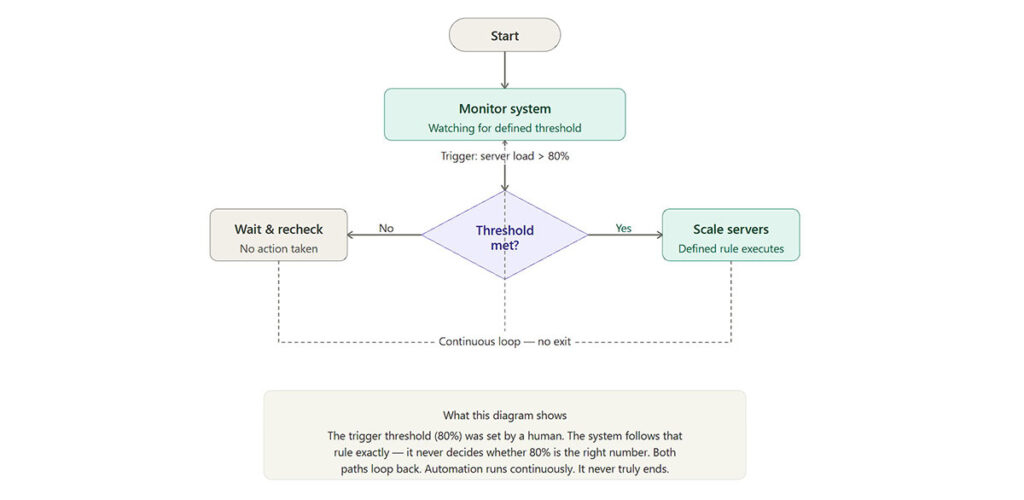
Automation executes instructions. That’s the whole job description. When a form is submitted, send an email. When a row is added to a spreadsheet, create a task. And when a file lands in a folder, rename it and move it somewhere else. These are logical chains, not decisions — and they run exactly as specified, whether the input makes sense or not.
Zapier, Make, n8n, and Power Automate are all built around this model. They’re workflow orchestration tools. They move data between systems on defined conditions. The logic is yours; the software just runs it.
What makes automation genuinely powerful — and genuinely limited — is that it never deviates. A Zap that worked last Tuesday will work the same way next Tuesday, regardless of what changed in context. That consistency is the point. Finance reconciliation, lead routing, notification systems, report generation from fixed data sources — these don’t need creativity. They need to happen the same way every time without someone watching.
The moment a task requires judgment, interpretation, or a response to input it hasn’t seen before, automation hits a wall. It doesn’t gracefully degrade. It either fails silently or throws an error.
What AI Is Actually Doing
Generative AI — the kind running inside Claude, ChatGPT, Gemini, Midjourney, and similar tools — operates on probability, not rules. It’s predicting what output fits best given the input, drawing on patterns from its training. It doesn’t retrieve stored answers. It constructs responses in real time.
This is why it handles ambiguity well. Ask an AI to write a client proposal, evaluate a piece of copy against a brand voice, or generate an image from a vague description — and it produces something useful without needing precise rules to follow. Feed the same kind of open-ended input to a Zapier workflow and nothing happens, because nothing matches its trigger conditions.
The practical implication: AI is the right tool when the input varies, when judgment is required, or when the output needs to be original. It is not the right tool when you need a task done identically every time. Probabilistic systems introduce variability by design. That’s a reasonable trade-off in a content workflow. It’s a serious liability in a financial reconciliation.
One category worth understanding separately: AI-enhanced automation. Zapier now embeds AI steps in its workflows. Make has AI modules. These aren’t AI tools — they’re automation pipelines with an AI node inserted at specific decision or generation points. The distinction matters when you’re architecting something for a client, because the failure modes of each layer are different and need to be handled differently.
The Mistake That Actually Costs People
The terminology confusion is surface-level. The deeper problem is tool-task mismatch — and it tends to go in both directions.
Tasks that require nuanced judgment get handed to automation systems that can only follow rules. Lead qualification is a common example. A Zap can route a lead based on which country field they filled in. It cannot assess whether the lead’s company size, job title, and stated problem actually fit the product. That requires interpretation. Businesses build scoring rules trying to approximate that judgment, then wonder why their pipeline quality is inconsistent.
The opposite mistake is subtler but equally costly: using AI for tasks where a deterministic system would be faster, cheaper, and more reliable. Moving a file from Dropbox to Google Drive when a form is submitted doesn’t need an LLM call. Generating a weekly status report from fixed database fields doesn’t need generative AI. Using AI here adds cost, introduces output variability, and creates a dependency that breaks if the prompt changes or the model updates.
There’s a third mistake, mostly made by people newer to this space: assuming that “automated” means “smart.” An email sequence that fires at set intervals is automated. It has no understanding of the recipient, the relationship context, or whether the timing still makes sense. Automation scales execution. It doesn’t scale judgment. Conflating the two leads to systems that run reliably while producing poor results — which is a harder problem to diagnose than a system that simply breaks.
How a Real Hybrid Workflow Actually Works
The most effective setups aren’t a choice between AI and automation. They’re architectures where each handles what it’s designed for, in sequence.
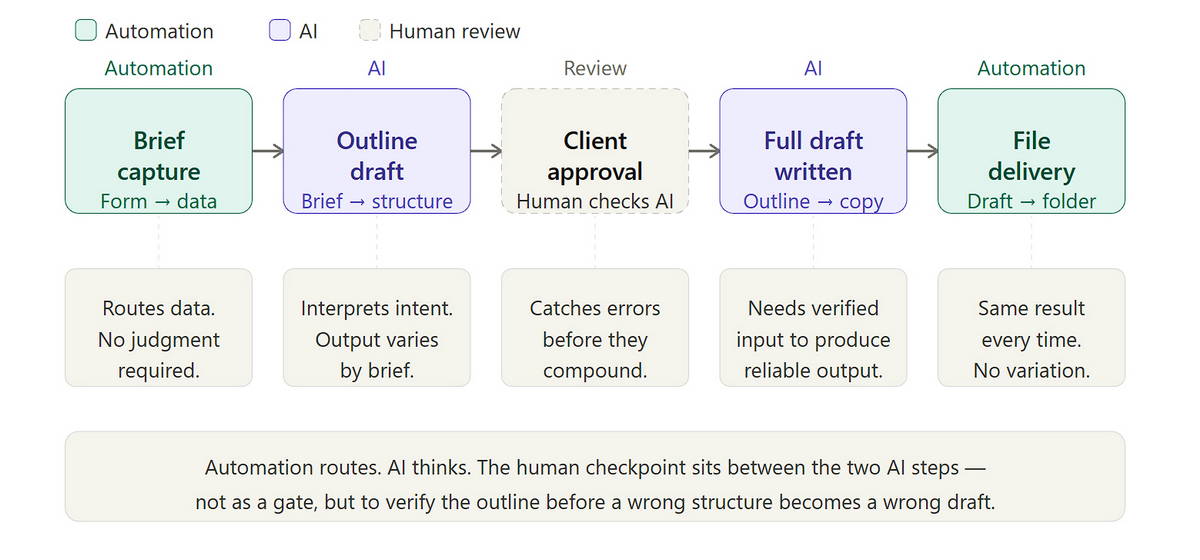
Consider a freelance content strategist building a delivery system for a content agency. The brief arrives through a client form — automation captures it and passes the structured data downstream. That brief goes to an AI (via API) to generate a first-draft outline tailored to the client’s stated goals. The outline comes back, gets routed automatically to the client for approval, and sits in a holding state. On approval, another trigger fires the full draft request to the AI. The completed draft saves automatically to a shared document folder.
The automation handles routing, triggers, and file management — things that need to happen the same way every time. The AI handles brief interpretation and draft generation — things that need to vary based on input. The strategist handles quality control and client communication — things that need human accountability.
The reason most people miss this architecture isn’t technical complexity. It’s that it requires you to map each task to the right capability before building anything. That mapping step gets skipped when people are trying to move fast.
One architectural note: error handling belongs in the design phase, not the troubleshooting phase. When an AI step produces unexpected output that flows into an automation trigger, debugging the failure across two different systems is genuinely hard. Build fallback conditions and review steps from the start.
Where the Income Opportunity Is (And Where It Isn’t)
The weakest positioning in this space is “I use AI tools.” That’s a feature description, not a value proposition — and the market is saturated with people making that claim.
The strongest positioning right now is architectural: the ability to diagnose which problems belong to automation, which belong to AI, and how to connect them into a system that produces consistent results for a specific business use case.
Businesses understand, vaguely, that they should be using these technologies. They don’t know which tasks to hand off, which tools to trust, or how to evaluate whether a vendor’s solution actually solves their problem. That gap is where service providers can charge well — not for access to tools, but for judgment about how to deploy them.
Three income models worth distinguishing by entry point:
Service delivery with AI-assisted production is the lowest barrier to entry. You use AI tools (Claude, Midjourney, Copilot) to produce deliverables faster, and lightweight automation to handle the operational overhead — client onboarding, file delivery, invoicing. Your output per hour increases; your margins follow. This is the right starting model for most freelancers.
Workflow architecture for clients is more demanding but more defensible. You charge for designing and implementing the hybrid system — the Zapier flows, the API connections, the prompt structures, the review checkpoints — not for executing the tasks the system automates. A content agency paying $200/month for a tool subscription will pay $3,000–$8,000 for the workflow that makes that tool actually useful. The deliverable is the architecture.
Productized systems — templates, workflow blueprints, prompt libraries, mini-courses on specific stacks — are the hardest to launch and the most scalable once established. The audience for “how to build AI workflows in Make for content teams” is more specific and more willing to pay than the audience for “learn AI.”
The realistic ceiling on each model differs significantly. Service delivery scales with your hours. Workflow architecture scales with scope. Productized systems scale independently of your time — but they require you to have built something worth documenting first.
What Breaks (And When)
AI tools produce confident, well-formatted output that is sometimes wrong. Not occasionally — regularly. Any workflow using AI for research, legal summaries, financial analysis, or factual claims needs a human review step. That’s not a product limitation to work around; it’s a design constraint to build around.
Automation is more reliable than AI, but it’s not stable. APIs change authentication methods. Platforms update their terms of service. A workflow running cleanly for eighteen months can break overnight without warning. Maintenance is a recurring time cost that doesn’t appear anywhere in a tool’s pricing page — and if you’re building for clients, it belongs in your service contract.
Combining both adds compounding maintenance overhead. Hybrid systems have more failure points and harder debugging paths. The argument for building them anyway is that they produce results neither system achieves alone. The counterargument — which is worth taking seriously — is that a simpler solution you can maintain reliably often outperforms a sophisticated one you can’t.
A Reference Point for Choosing
Neither tool is universally better. The right choice follows the task.
Reach for automation when a task is repetitive, the input is structured, and the correct output is always the same. Reach for AI when the input varies, the task requires interpretation, or the output needs to be original. Go for both — in sequence — when the workflow involves high-volume production where some steps are mechanical and others require judgment.
The question worth asking before building anything: If this task produced the wrong output, would I know immediately? Automation errors tend to be obvious — a file didn’t move, an email didn’t send. AI errors tend to be invisible — the output looks correct and reads confidently, but the underlying information is wrong. Design your review steps accordingly.
The Point
AI and automation solve different problems. One executes logic reliably. The other handles ambiguity intelligently. The professionals building durable income from these technologies aren’t the ones who use the most tools — they’re the ones who’ve stopped treating the two as interchangeable and started designing systems that use each where it actually belongs.
That architectural thinking is harder to learn than any specific tool. It’s also harder to commoditize.
Learn more about AI vs Machine Learning & How Do AI Tools Actually Work?