

Running a business alone used to mean doing everything, just slowly. Today it means constantly deciding what still needs a human touch and what doesn’t. Every research task, every draft, every client email is a small decision point, and how a solopreneur handles thousands of those decisions is the real difference between someone drowning in their to-do list and someone whose one-person operation quietly performs like a five-person team.
The tools behind this shift aren’t new. What changed is how well they connect. A freelance writer, a coach, a boutique agency owner, or someone selling digital products can now stitch together research, content creation, design, and operations without hiring anyone. The hard part was never learning the software. It’s structural: knowing which tool covers which job, and building a workflow that survives the moment volume increases.
This playbook covers what an AI-powered one-person business looks like with tools that exist right now, not a hypothetical future stack, where that setup tends to break down, and what a realistic build-out involves.
What “AI-Powered” Really Means When You’re a Team of One
For a solopreneur, “AI-powered” is a substitute for headcount, not a marketing label. Every task a small agency would hand to a researcher, copywriter, designer, or operations coordinator now has a tool that can produce a rough version of that work in a fraction of the time a human would take.
The human role doesn’t disappear so much as move up a level. Instead of producing every piece of work from scratch, the solo operator becomes an editor sitting on top of several AI systems, reviewing output and deciding what’s good enough to ship. What clients or customers pay for shifts too. “I can write” or “I can design” matters less than “I can tell good work from mediocre work fast, and I know exactly what this audience needs.” That’s a different skill than running a solo business used to demand, and it rewards judgment over raw output speed, since the software already covers speed.
This is also where the money question sits. Solopreneurs chasing a way to make money with AI tools often go looking for one breakthrough product. The more dependable paths are less exciting: a fixed-scope service built around AI freelance tools that let one person deliver what used to take a small team, a digital product like a template or guide, or consulting where AI speeds up delivery but the advice itself remains the thing being sold. None of these require a new business model. They mostly require running an existing one with fewer hours spent on production.
The Core Stack: Five Roles, Five Tools
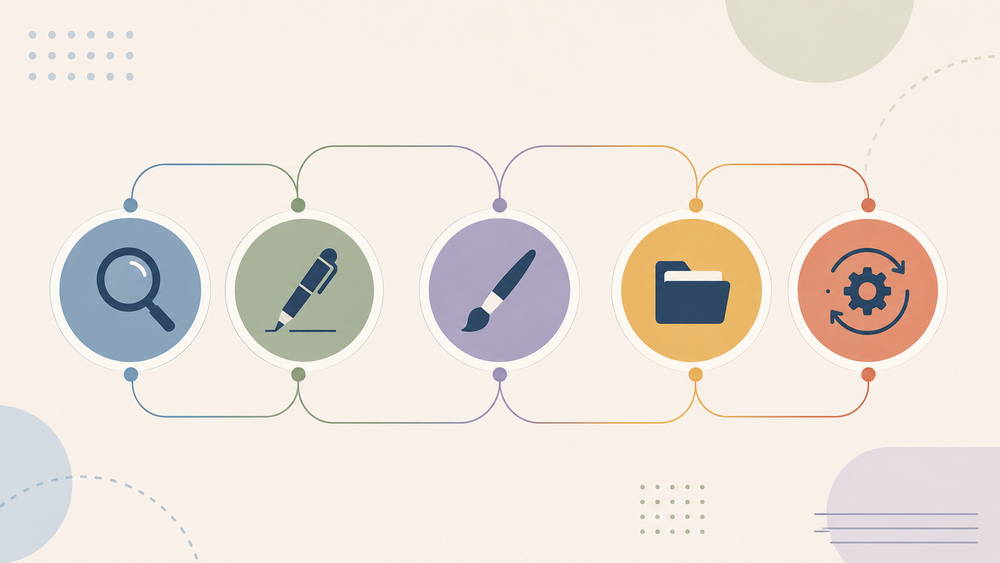
Instead of chasing every new AI release, it helps to think in terms of roles. A small business typically needs someone doing research, someone writing or producing content, someone handling design, someone managing operations, and someone connecting the pieces so work doesn’t get copied by hand between apps. The AI productivity tools below map onto those five roles, with pricing current as of August 2026.
Research and Fact-Checking
Perplexity pulls current, cited information faster than manually cross-checking five sources, which matters most for anyone writing about fast-moving topics like AI tools themselves. Pro runs $20 a month, or about $16.67 a month on the $200 annual plan, and includes access to several underlying models plus document uploads. The citations are a real advantage over a plain chatbot, though they’re worth spot-checking on anything with legal, medical, or financial stakes. A cited source isn’t automatically an accurate one.
Writing and Client-Facing Work
Two tools dominate this category, and they’re not interchangeable. Claude, from Anthropic, tends to hold up better across long documents, keeping a consistent voice through multiple drafts, and analytical tasks like restructuring a messy outline or summarizing scattered client feedback. Pro costs $20 a month, or $17 monthly on annual billing.
ChatGPT covers more ground in a single interface: quick copy, image generation, basic coding help. Plus is also $20 a month. A freelance copywriter drafting long-form client work might lean on Claude for the actual writing and keep ChatGPT around for quick turnaround tasks and image assets. Running both costs $40 a month combined, so starting with one and adding the second only once it earns its keep is the more sensible order.
Visual and Brand Assets
Canva Pro replaces hiring a designer for routine assets: social posts, slide decks, brand kits, thumbnails. It’s $18 a month billed monthly, or $144 a year, which works out to roughly $12 a month annually. Where it falls short is anything requiring genuine custom illustration or a distinct visual identity; templates look like templates eventually, and a business built entirely on Canva assets can start to look interchangeable with competitors pulling from the same library.
Operations and Knowledge Management
Notion holds client notes, content calendars, and standard operating procedures in one place instead of scattered across documents and messages. Notion bundles full AI, including its research and agent features, into the Business plan at $20 per member monthly on annual billing ($24 billed monthly). The Plus tier, at $10 per member monthly annually, still covers basic organization without the AI layer, which is enough for anyone who mainly wants a system of record rather than an AI assistant living inside it.
Automation and Handoffs
Zapier connects the other tools so information doesn’t need retyping between them: a form submission that automatically creates a Notion task and fires off a confirmation email, for instance. The free plan covers light use at 100 tasks a month. Paid plans start around $19.99 to $29.99 monthly on annual billing for roughly 750 tasks, and pricing scales with volume from there. That last part is worth sitting with: Zapier’s bill grows with how busy the business gets, not with how much value each automation delivers, so a solo operation that suddenly books more leads ends up paying more for the exact same workflow.
None of these six tools are mandatory in combination. A solo consultant might only need Claude and Notion. A content creator might lean harder on Canva and Zapier. Coverage across the five roles matters more than owning every tool.
Where Most Solo Operators Get the Stack Wrong
Picking too many tools before proving one workflow actually holds up is the most common misstep, and it’s an expensive one, both in subscription costs and in the mental overhead of remembering which tool does what. AI beginners are especially prone to treating a fresh subscription as progress in itself, when it’s really just another line item until it’s tied to a specific, finished task.
Treating AI output as a finished product instead of a first draft causes quieter damage. Generative AI gets to 70 or 80 percent of a good result quickly. The remaining stretch, the part shaped by specific client context, brand tone, or factual precision, still needs a human pass. Skip that step and generic phrasing or small factual slips end up in front of paying customers.
There’s a less obvious mistake too: automating a process before running it manually enough times to know it actually works. Automation multiplies whatever’s already happening. Inconsistent client intake questions or unclear handoff points don’t get fixed by automating them; they just happen faster and at scale, harder to catch before it reaches someone.
A quieter version of the same problem shows up in how people justify buying tools. Adding a fourth or fifth subscription can feel like momentum, like the business is becoming more serious. It’s often the opposite: time spent configuring another tool is time not spent on the harder work of finding clients or refining an offer. AI makes production cheap. It doesn’t make positioning or sales cheap, and no amount of stacking changes that math.
The Strategic Insight Most Playbooks Skip
Most advice in this space is a tool list. The better question is what a solo operator does with the hours those tools free up.
Speed by itself isn’t an advantage, since every competitor has access to the same tools at close to the same price. What matters is what happens with the reclaimed time: more direct conversations with potential clients, tighter positioning, faster iteration on whatever’s actually selling. AI compresses production. It has nothing to say about who to serve or how to stand out, and that thinking still runs entirely on human judgment.
One concrete way to bank this advantage is a personal prompt library: saved instructions, tone guides, and templates for tasks that repeat every week. It keeps quality consistent without re-explaining context each time, and it becomes a real asset over time rather than a folder of one-off conversations that vanish once the tab closes.
What a Realistic Week Looks Like
A workflow runs a business, not a tool list. A solo content operation might spend Monday pulling current data in Perplexity for two or three pieces, draft with Claude or ChatGPT through midweek, move into Canva for visuals and thumbnails, then log everything in Notion so nothing depends on memory. Zapier runs underneath, moving form submissions or client replies into the right place without manual copying.
That system doesn’t run itself from week one. Expect a few weeks of adjusting prompts, fixing automations that break unexpectedly, and figuring out where AI output needs the heaviest editing, before it stops feeling like extra work bolted onto the job.
Limitations and What to Actually Expect
AI tools speed up people who already know what good work looks like in their field. They’re far less useful for someone trying to skip developing that judgment altogether, since catching and correcting AI output requires already knowing what “correct” looks like.
Factual errors and hallucinations remain a real risk, even in research tools built around citations. Automations break the moment a connected app changes its interface, or when a free-tier limit gets hit mid-month with no warning. And the subscriptions add up: a reasonably equipped solo stack can run $80 to $150 a month before any revenue shows up, worth reviewing every few months instead of treating the initial setup as permanent.
The biggest limitation isn’t technical. Sales conversations, trust-building, and reading what a client actually needs versus what they’re asking for are still manual work, and no tool in this stack changes that. AI can prepare the materials for those conversations. It can’t sit in the room for them.
The Practical Takeaway
Building a one-person AI-powered business isn’t about owning the most tools. It’s about covering research, creation, design, organization, and automation with as few tools as possible, then running them consistently enough that the workflow stops being interesting and starts being routine.
A few starting principles worth keeping:
- Start with one paid AI tool and one free automation, not five subscriptions at once
- Prove a workflow manually before automating any part of it
- Track hours saved per week, not the number of tools in the stack
- Revisit the toolset every quarter, since pricing and features in this category shift often
The businesses that hold up aren’t the ones with the most AI packed into them. They’re the ones where AI quietly handles the repeatable parts, leaving the person running the business free to spend their limited hours on the parts only they can do.
Also check Best AI Tools for Small Business Owners on a Budget (2026 Guide), A Realistic AI Agent Workflow for Freelancers and Solopreneurs, What Is an AI Agent? A Beginner’s Guide & Building an AI Toolkit That Actually Fits Your Workflow