


Ask a single AI assistant to write a blog post, and it writes a blog post. Ask a multi-agent AI system to handle a content campaign instead. One agent researches the topic. Another drafts three angles. A third checks the draft against what you’ve already published. A fourth formats everything for your CMS and flags what still needs your eyes. You touch one output instead of five tools.
That’s the practical difference between a model that responds and a system that coordinates. It explains why multi-agent AI systems have moved out of developer forums and into everyday conversations among freelancers, agencies, and product teams this year. It isn’t a rebrand of automation. It isn’t magic, either. It’s a different way of structuring work. The trade-offs are worth understanding before you build anything around it.
What a Multi-Agent System Actually Is
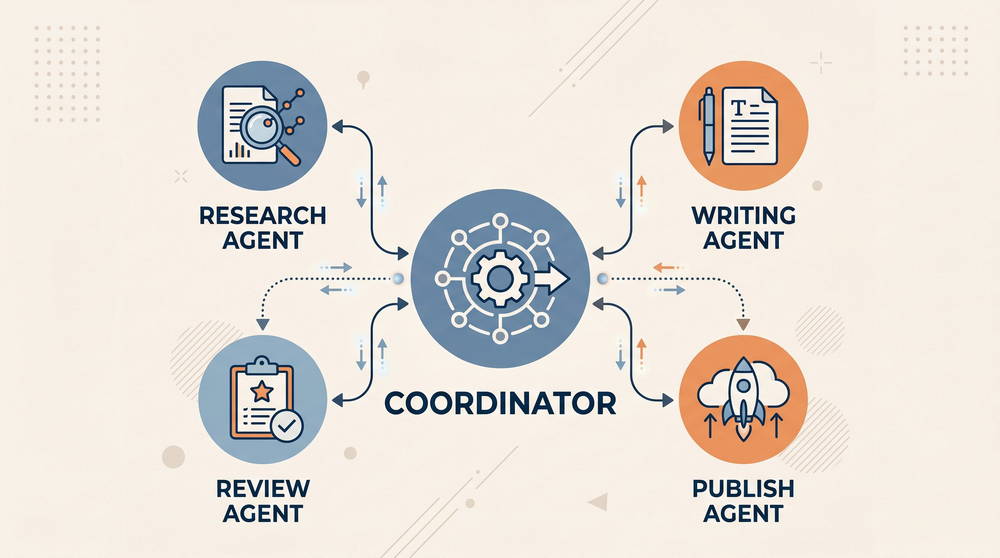
Strip out the marketing language and a multi-agent AI system comes down to this: several AI agents working together on one larger task. Each agent has a defined role, its own tool access, and its own instructions, and hands its results to the next agent in line. One agent might specialize in research, another in writing, another in quality control. A coordinator agent, sometimes called a manager or orchestrator, decides who does what and assembles the final result.
That’s different from running the same model three times with three different prompts. In a genuine multi-agent setup, agents pass context to one another and call different tools. They sometimes rely on different underlying models suited to their specific job, and they can loop back to an earlier agent when something doesn’t check out. The system holds memory of its own process, not just the conversation.
How This Differs From a Single Assistant or a Standard Automation Tool
A single AI assistant is reactive: prompt it, it responds, done. A traditional automation tool, the Zapier or n8n kind, is deterministic: if X happens, do Y, in a fixed sequence you set ahead of time. Multi-agent systems sit between the two. They follow a structure you designed, but each agent makes its own judgment calls inside its role. That’s what makes the output feel like delegation instead of a script.
Why the Conversation Picked Up Now
Multi-agent systems aren’t a new idea. Researchers have studied agent coordination for years, long before anyone outside a lab paid attention. What changed is the underlying models. Generative AI finally got reliable enough at multi-step planning and tool use, and non-research teams started trusting agents with real handoffs instead of babysitting every step.
Orchestration frameworks grew up alongside that shift, moving from academic demos into products with dashboards, logging, and error handling. New standard protocols now let agents reach outside tools and data, instead of requiring a custom integration for every connector. That cuts the engineering overhead of building an agent team from scratch. Put those pieces together and agent orchestration becomes a default layer across AI productivity tools and digital workflows. It’s no longer a novelty that only research labs use.
There’s a blunter adoption signal too. CrewAI, one of the most widely used open-source orchestration frameworks, says roughly two-thirds of Fortune 500 companies now use its platform, up from about half two years earlier. Take a vendor’s own adoption number with a grain of salt. The broader direction still matches what’s showing up across enterprise and small-business tooling alike: this stopped being a hobbyist trend somewhere in the last eighteen months.
Where Multi-Agent Systems Earn Their Keep
Multi-agent systems work best on tasks with clear stages. They also do well on tasks that benefit from specialization, or that don’t hinge on split-second decisions. That covers a lot of knowledge work, though not all of it.
Content teams use them to move a topic from research to a published, formatted draft. No one has to manually shuttle files between five different apps. A freelance content strategist juggling several retainer clients might run a two-agent crew. One agent handles research and outlining, the other writes a first draft, while the strategist keeps the client-facing edit and tone pass manual. Sales and marketing operations lean on them for lead research and qualification. One agent enriches a contact, another scores fit, and a third drafts outreach. Small teams use them for support triage. An agent categorizes and routes a ticket before a human ever sees it. That alone cuts response time without pulling a person out of anything sensitive.
Freelancers and solopreneurs tend to get more relative value out of this than large teams do. It’s not that the systems are more capable in their hands. The real difference is time. Manually switching between six tools all day costs a solo freelancer more of their own hours than it costs a bigger team that can spread the same work across several people.
A Workflow That Holds Up in Practice
A realistic setup for a solo content creator or small agency uses four agents, each with one job:
- A research agent pulls recent coverage and data on the topic.
- A drafting agent writes a first pass in a defined voice.
- An editing agent checks structure and factual consistency against the source material.
- A formatting agent outputs the piece in the right template for the CMS or newsletter tool.
The human reviews once, at the end, instead of managing every handoff along the way.
This holds up because each stage has a narrow job. It falls apart when a stage is too open-ended, like asking an agent to “make this good.” Vague roles produce vague, inconsistent output, regardless of agent count.
Where the Hype Outruns the Reality
The most common misjudgment isn’t about what these systems can do. It’s about what they cost to run. Each additional agent adds another point where things can go wrong, plus another set of API calls that quietly add up. A five-agent crew processing a single request can burn far more tokens than one well-prompted single-agent call. That gap grows once agents start passing long context back and forth between each other. A workflow that looks cheap in testing can get expensive fast once it’s running against real volume.
Autonomous Doesn’t Mean Unsupervised
There’s also a habit of treating “autonomous” as “unsupervised.” Multi-agent systems still compound errors. If a research agent misreads a source, every later agent inherits that mistake. The error is often harder to catch, too, because the finished output looks polished rather than obviously wrong. Review still has to happen somewhere in the chain, ideally at any step touching anything public-facing or financial.
More agents don’t automatically mean a better result, either. A tightly scoped two-agent workflow regularly beats a loosely scoped six-agent one. Agent count doesn’t measure sophistication. How cleanly you define each role does.
Where This Doesn’t Fit at All
None of this means multi-agent systems are a bad idea. It means they’re a poor fit for some jobs. If a single, well-prompted model call can already finish a task reliably, extra agents just add cost without adding value. A ten-email support inbox that someone already clears before lunch doesn’t need a triage agent standing in front of it. These systems earn their cost on genuinely multi-step, specialization-heavy work. They don’t earn it on tasks that were never that complicated to begin with.
Tools Worth Knowing, and What They Actually Cost
A handful of platforms have become the default starting points for building multi-agent workflows, spanning different technical comfort levels. The pricing below reflects what each platform publishes as of August 2026, and it’s worth checking again before you commit since these numbers shift often.
CrewAI
CrewAI is the most widely referenced orchestration framework for role-based agent teams. The open-source Python framework is free under an MIT license, and you can self-host it. You’ll still need to supply your own LLM API keys, which end up being the real ongoing cost.
Its hosted platform, CrewAI AMP, currently offers two plans:
- Basic (Free): 50 workflow executions a month, visual editor, GitHub integration
- Enterprise (Custom pricing): SSO, role-based access, dedicated infrastructure, and governance features
A common mistake is jumping straight to AMP before testing whether the free, self-hosted framework already covers the job. Most solo builders don’t need the hosted layer until they’re deploying for a client, not just for themselves.
Relevance AI
Relevance AI takes a no-code approach to building an “AI workforce” of agents you assemble visually rather than code. Its public pricing page currently leads with a custom Enterprise quote, but self-serve signup still surfaces three tiers:
- Free: 200 Actions a month
- Pro: around $19 a month, billed annually
- Team: roughly $234 a month, billed annually
Costs split across two separate meters: Actions for what an agent does, and Vendor Credits for the underlying model cost. That dual-meter billing is harder to forecast than a flat subscription. A single workflow that touches several tools in one run can burn through the monthly Action allowance faster than the headline number suggests. It’s a reasonable entry point for non-developers who want multi-agent orchestration without code, as long as someone keeps an eye on usage.
n8n
n8n isn’t purpose-built as a multi-agent framework. Its AI agent nodes still make it a practical way to chain specialized agents into a broader automation, alongside the non-AI steps most real workflows still need, like updating a spreadsheet or sending a Slack message.
The Community Edition is free and self-hosted, with no execution limits, though you cover your own server costs. Cloud plans scale from there:
- Starter: around $20 to $24 a month, 2,500 executions
- Pro: roughly $50 to $60 a month, 10,000 executions
- Business: self-hosted, custom pricing above that
- Enterprise: custom pricing
The execution cap catches people off guard on the cloud tiers. A workflow that polls an inbox or a database every few minutes can burn through thousands of executions before it does anything useful. It’s worth checking your trigger frequency before assuming a plan will cover real usage.
The Strategic Read Behind the Trend
The more interesting shift isn’t the tools themselves. It’s what they’re doing to the shape of freelance and solopreneur work. A growing number of people are positioning themselves differently now. Instead of writers, marketers, or virtual assistants who happen to use AI, they’re calling themselves builders of AI freelance tools and agent workflows for other small businesses. In effect, they’re selling the orchestration layer itself as a service.
That’s a genuine opportunity, and one that gets oversold just as often. Building a working agent crew for a client is a legitimate, billable skill. On its own, though, it isn’t a reliable way to make money with AI tools. The usual business fundamentals still apply: client acquisition, honest scoping, ongoing maintenance. Agents don’t run themselves indefinitely. Workflows drift, APIs change, and someone has to own the upkeep. Think of multi-agent systems as infrastructure you can build a service around, not as a product that sells itself.
For everyone else, the read is simpler. This is becoming a normal part of how people do digital work. Spreadsheet macros and basic automation zaps went through the same shift in earlier cycles. Fluency with it is turning into a baseline skill for knowledge workers, not a specialty.
How to Actually Start Using This
Skip the six-agent dream workflow on day one. AI beginners in particular do better starting narrow than starting ambitious. Pick a task you already do by hand, one you understand well enough to spot when something goes wrong. A two-agent process built around that task teaches more about how handoffs actually behave than a complex build ever will. A research-and-draft pair, or a categorize-and-route pair, is plenty to start.
Use the free tier of whichever tool matches your comfort level, rather than committing to a paid plan before your usage pattern is clear. Watch for what breaks the workflow first: vague instructions, missing context between agents, a role that’s secretly two jobs. Fix those before adding complexity. Once a small crew reliably does what you’d otherwise do by hand, expanding it is a far smaller lift. Starting from six agents and troubleshooting backward almost always costs more time than it saves.
Multi-agent AI systems deserve the attention they’re getting, but the payoff comes from scoping, not scale. The teams doing this well aren’t running the most agents. They’re running the fewest agents that still get the job done, on tasks specific enough to measure whether it worked.
Also read What Is an AI Agent? A Beginner’s Guide, AI Agents for Customer Support: Setup Guide for Small Teams, & A Realistic AI Agent Workflow for Freelancers and Solopreneurs