

Ask two people to get a marketing email out of an AI tool. You’ll sometimes get two completely different outcomes from the same model, on the same day. One person copies the output straight into their inbox. The other spends twenty minutes rewriting it. The tone is off, the structure doesn’t match the brand. The call-to-action could belong to any product on earth. The model didn’t change between those two sessions. The instructions did.
Prompt engineering explains that gap. It isn’t a technical discipline reserved for developers, nor a trend that faded once AI tools got “smarter.” At its core, it’s the skill of turning a request into instructions a model can actually execute. For AI beginners and experienced professionals alike, that skill decides the outcome. It’s the difference between a genuine productivity tool and an expensive way to produce drafts you’ll still rewrite.
Most people already sense this. They’ve had the good session and the bad one, sometimes in the same week. Both times, they assumed the model was just having an off day. That’s rarely what’s happenin
Why Vague Prompts Cost More Than They Save
A language model doesn’t know what you meant, only what you typed. It predicts the most statistically likely continuation of the text in front of it. Feed it “write a LinkedIn post about productivity” and it returns the most average version it can construct. Nothing in the prompt pointed it anywhere else.
The cost of that vagueness rarely shows up as an obvious failure. It shows up as time. A freelancer asking for “a product description” might get something usable on the fourth try. That often takes three rounds: “make it shorter,” “make it sound less corporate,” “focus more on the benefits.” Each follow-up is a correction for information that could have been in the original prompt. Multiply that across a week of client work, content production, or internal reporting. The minutes add up to hours that were never technically wasted, but weren’t productive either. Few people actually track this kind of drift. That’s exactly why it stays invisible, until a full month of billable hours makes the pattern obvious.
The stakes are higher for people using AI to generate income than for casual users. A solopreneur testing an AI tool out of curiosity can afford three sloppy attempts at a caption. A freelancer billing for turnaround speed generally cannot.
The Four-Part Structure Behind Every Precise Prompt
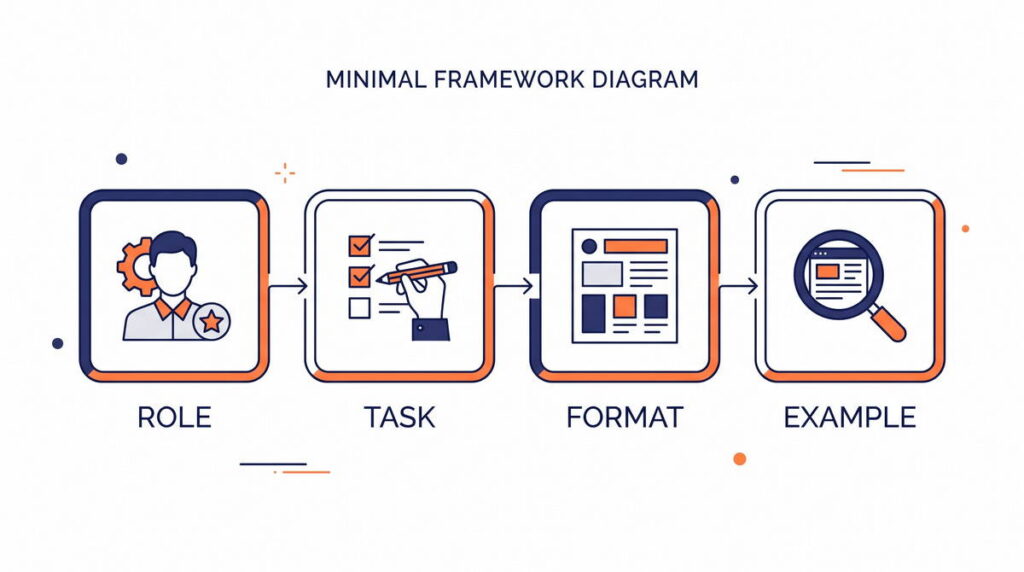
Precise prompts aren’t longer for the sake of length. They’re specific in four places where vague prompts leave gaps.
Give the Model a Role and a Reason
Telling a model who it should act as, and why the output matters, narrows its range of possible answers. This happens before it writes a single word. “Act as a B2B email copywriter writing for a SaaS company targeting operations managers” is one instruction. “Write a sales email” is another. Both describe the same task, but they produce very different drafts. The trade-off shows up when people stack too many roles into one instruction. Asking a model to act as copywriter, SEO strategist, and brand consultant all at once usually backfires. One clearly stated role beats three vague ones.
Replace “Write About X” With a Scoped Task
“Write about productivity” has no boundaries: no audience, no angle, no limit on scope. “Write a 400-word explainer for freelancers on why time-blocking fails without a weekly review” has all three. The second version can only be answered one reasonable way.
Decide the Output Format Before You Ask
Bullet points or prose. Table or list. Word count range. Whether headers are needed. A freelance writer working for an e-commerce client might specify sixty words each, no headers, one call-to-action per blurb. That single line of instruction cuts out an entire round of back-and-forth. Deciding format upfront, instead of reformatting after the fact, is one of the simplest ways to cut editing time.
Show an Example Instead of Just Describing One
Few-shot prompting means pasting one or two examples of the tone or structure you want. It consistently outperforms describing that tone in the abstract. Models are far better at matching a pattern than interpreting an adjective like “punchy” or “professional.” The catch is that this step assumes you already have one usable example on hand. Writers just starting out often don’t. That’s exactly when the first three elements need to carry more of the weight.
None of this requires technical skill. It just takes slowing down at the exact moment most people speed up, right before hitting enter.
The Small Mistakes That Undermine Otherwise Good Prompts
Most people don’t prompt badly because they lack ability. They prompt badly because they treat AI tools like a search engine: type a query, take the first result, move on.
A few patterns show up constantly across ChatGPT, Claude, and similar assistants:
- Treating the first output as final. The first response from any model is a starting draft, not a finished product. Iteration is part of the workflow, not a sign the tool failed.
- Skipping constraints entirely. Not mentioning what to avoid, such as jargon, passive voice, or a specific length, leaves the model guessing, and it guesses toward the generic middle.
- Ignoring persistent instructions. Both ChatGPT and Claude let users set standing preferences, through custom instructions, system prompts, or saved context, so tone and formatting don’t need re-explaining every session. Almost nobody uses this.
- Assuming every tool behaves the same way. A prompt that performs well in Claude for long-form writing might underperform in Midjourney for image generation or Perplexity for research synthesis, because each tool is optimized for a different kind of task.
- Not specifying the audience. “Explain this simply” means something different to a beginner than to an industry expert, and the model has no way to know which one you mean unless told.
Individually, each mistake looks harmless. Together, they explain how two people can use the same AI tool for the same task and land in completely different places by the end of the session.
Turning Precision Into Paid Work
What Changes for Freelancers and Creators
For freelancers and content creators, prompt precision isn’t just about output quality. It’s about capacity. A writer who gets a usable draft from a well-structured prompt can take on more client work. They don’t need to extend their hours to do it. Less time goes into extracting a usable draft. More time goes into the parts that actually require human judgment: strategy, editing, and client-specific nuance.
This is where claims about making money with AI tools tend to get overstated. Prompt engineering doesn’t generate income by itself, and it isn’t a shortcut around expertise. A well-built prompt still needs a human who understands the audience and catches factual errors. It also needs someone who knows when a confident-sounding draft is quietly wrong. What it changes is throughput. That’s the number of deliverables a freelancer or small business owner can realistically produce in a working week.
Where This Shows Up in Practice
A few realistic patterns show where this plays out. A freelance copywriter with a reusable prompt template might cut a 45-minute product description task down to 15 minutes. Most of that remaining time goes to editing, not drafting from scratch. A newsletter writer might use a structured prompt to generate a first-draft outline. That frees up their actual writing time for voice and personal insight, instead of structure. A small business owner might use a scoped prompt to draft routine customer service replies. They review and send, rather than starting from a blank page every time.
What connects these examples is the division of labor. The AI produces the mechanical first pass, and the person makes the judgment call at the end. That’s a different model than the “AI writes the whole thing” pitch common in ads for AI productivity tools. Freelancers who treat this as part of a broader stack tend to see the savings compound, not stay flat. That stack often includes dedicated AI freelance tools for scheduling, invoicing, or client communication.
The Limits Worth Knowing
These are illustrative patterns, not documented case studies. Actual results vary by task, tool, and how much a given niche genuinely requires editing. The underlying mechanic, reducing time between draft and usable output, is where the real value sits. It isn’t a shortcut to income, and it isn’t a hidden trick that produces publish-ready content untouched.
There’s a ceiling to this, too. Prompt engineering helps most with tasks that already have a clear structure and a defined audience. It also needs enough of a pattern for a model to learn from an example. It helps far less with work that depends on original judgment. That includes guessing what a client needs before they’ve said it. It also means catching an error only a specialist would recognize. Treating prompting as a substitute for that judgment, rather than a way to speed it up, is a mistake. It’s usually where the more inflated claims about AI and income fall apart.
Building Prompt Systems, Not Just Prompts
The next stage past writing better individual prompts is treating prompting as infrastructure instead of a one-off task. That’s where it starts to overlap with AI automation and broader digital workflows.
Chaining Prompts Into a Workflow
Instead of rewriting a prompt from scratch every time, a reusable template gets saved. It has placeholders for what changes, like audience or tone, plus fixed rules for format and role. Some professionals go further and chain prompts together. One generates an outline, a second expands it, and a third edits for tone. The sequence often runs through automation platforms such as Zapier or Make, with minimal manual input.
This shift matters. It’s the difference between consulting AI as a tool and running it as a system built into the work. A single good prompt saves minutes. A prompt system, reused across dozens of tasks a month, saves hours. That gap is likely why some knowledge workers describe AI as having changed their workflow. Others who never move past one-off prompting see far more modest results.
Prompt systems aren’t free to build. They take upfront time to test and refine before they pay off. They also need occasional maintenance, since models update and behavior shifts. A template built for one version of a tool doesn’t always transfer cleanly to the next.
Your Starting Framework This Week
Prompt engineering doesn’t require a course or a certification to start improving. It takes picking one recurring task and applying structure to it on purpose, instead of typing the same vague request every time and hoping the output gets better on its own.
A practical starting point:
- Pick one task you do weekly, such as an email, a caption, or a report summary.
- Write a prompt that includes a role, a scoped task, a format, and one example.
- Save the version that works as a template, and reuse it instead of starting from scratch.
- Adjust based on what still needs manual editing, and fold that fix into the next version.
Don’t expect this to eliminate editing. No AI tool available today gets there. What changes is where the time goes: less spent coaxing a usable draft out of a vague request, more spent on the judgment calls that actually need a human. That shift, repeated across enough tasks, is what separates people who get real productivity value out of generative AI from people who tried it once, got a mediocre result, and wrote the whole category off.
Read more about Prompt Engineering in 2026: Is It Still a Skill Worth Learning?, AI Tool Myths That Are Costing You Time and Money & How to Create an AI Prompt Library That Actually Saves Time