


Ask a chatbot to draft a blog outline. It hands you an outline, nothing more. Ask an AI agent to publish a blog post. It researches the topic, writes the draft, formats it, and reports back on what it did. That gap explains why “AI agent” is one of the most searched terms in AI right now. It’s also one of the most misused, especially among AI beginners trying to make sense of the category.
Every tool with a chat window now claims to be “agentic.” Email platforms, spreadsheet plugins, browser extensions, customer support widgets, all of them. The label sells, so it gets attached to nearly anything with a text box. That makes it genuinely difficult to know what you’re comparing. This matters especially when you’re searching for AI freelance tools or AI productivity tools to run your business.
Here’s what actually separates an agent from the automation and generative AI tools already sitting in your browser tabs. And here’s where the category holds up in practice, and where it doesn’t.
What an AI Agent Actually Is
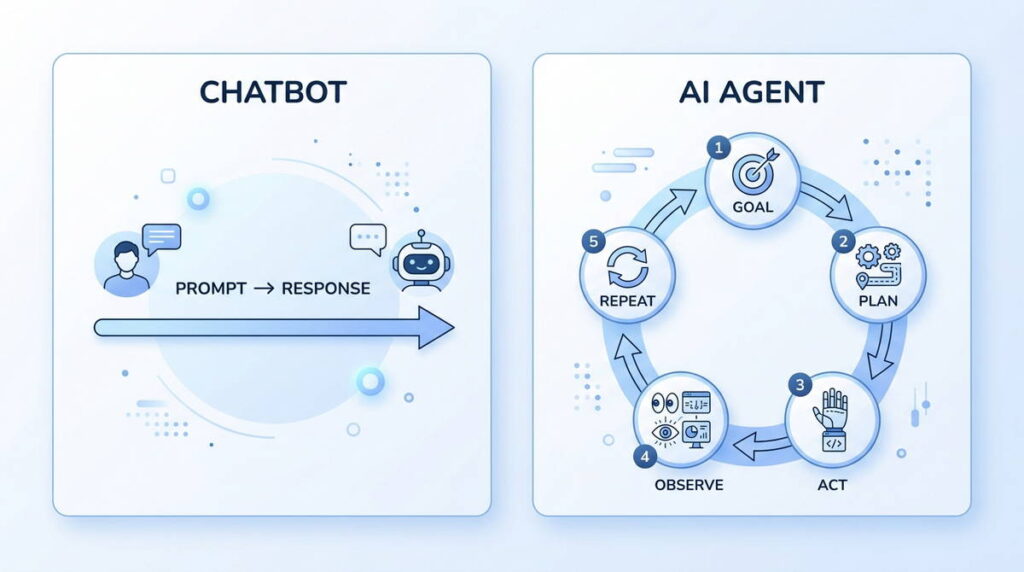
An AI agent is software that decides what to do next, then does it. It doesn’t just answer what you typed. That’s the core distinction. A chatbot reacts to a single prompt and stops. An agent works toward a goal across multiple steps. It chooses which tools to use and adjusts when something goes off plan. It keeps going until the task is finished, or until it hits a limit you set.
A working inbox agent shows the idea clearly. Instead of asking a chatbot to write one reply, you give an agent a broader goal: manage my inbox. It reads incoming messages and decides which ones need a response. Then it drafts replies in your tone and flags anything urgent. If nothing comes back in three days, it schedules a follow-up. You didn’t script each of those actions individually. The agent worked out the sequence from the goal itself.
That same decision-making is where things go wrong, too. Deciding what to do next is the useful part and the risky part in equal measure. An agent that misreads a situation acts on that misreading. It doesn’t just describe the problem back to you for a sanity check.
How the Loop Works
Strip away the marketing and an agent runs on three parts, all working in a loop. The first is a reasoning engine, almost always a large language model. This is the same kind of generative AI behind tools like Claude or ChatGPT. The second is memory, for holding the current task and, in more advanced setups, your longer-term preferences. The third is access to tools and actions: APIs, a browser, code execution, or a file system. That third part is what actually separates an agent from a chatbot. Without tool access, an AI system can only describe doing something. With it, the system does it.
The loop itself is easy to describe. It’s harder to trust blindly. The agent looks at the current state, whether that’s your inbox, a spreadsheet, or a support ticket. It plans a next move, executes it, and checks the result. Then it repeats, until the goal is met or it runs out of steps, budget, or permission.
Most tools sold as “AI agents” right now aren’t fully open-ended. They’re agentic workflows: bounded sequences where the AI has some room to decide. But they still operate inside guardrails someone set up in advance. Fully autonomous agents that invent their own sub-goals with no human checkpoints remain the exception rather than the norm. One development is worth knowing if you’re comparing tools. The Model Context Protocol, usually shortened to MCP, has become the standard way agents connect to outside data and software. If a platform advertises MCP support, that’s a reasonable signal. It means the tool can talk to a wider range of software without custom integration work on your end.
Agent, Chatbot, or Automation?
Chatbots Answer. Agents Finish the Job.
A chatbot’s job ends the moment it gives you an answer. It has no memory of acting in the world, because it never acted. An agent’s job isn’t done until the outcome actually exists. That means an email sent, a file updated, or a report compiled and filed away.
Automation Follows Rules. Agents Interpret Them.
Traditional automation, the kind built in Zapier or Make, runs on fixed logic: if this happens, do that. It’s fast, cheap, and predictable, but it breaks the moment a situation falls outside the rule someone wrote. An agent can look at an ambiguous input, a vaguely worded support message, for instance. It can decide how to route it without an exact rule existing for that wording.
The line between the two categories has blurred on purpose. Zapier now ships a product called Zapier Agents, and Make has added AI decision steps to its workflow builder. Neither company wants to be seen as “just automation” anymore. Whether that AI layer reasons or just picks from a short preset list is worth checking first. Do that check before you build a workflow around it. The marketing rarely spells out the difference.
What Most People Get Wrong
Assuming “agent” means hands-off. People set up a tool like AutoGPT expecting to define a goal once and walk away. In practice, most agents drift without checkpoints. A task that starts as “summarize this week’s analytics” can turn into “summarize and email the wrong client.” All it takes is one misread variable along the way. Guardrails aren’t optional here, they’re what separates a useful tool from a liability sitting inside your Gmail account.
Treating automation platforms and agent frameworks as interchangeable. Zapier and Make are automation-first products with AI decision steps layered on top. CrewAI and frameworks like it are built agent-first. They’re designed to plan and adapt across a chain of steps, without a fixed map to follow. Picking the wrong one wastes a weekend of setup work. Say you’re managing client deliverables and just need “if X happens, do Y” with an AI step in the middle. A no-code automation platform is the better starting point. Framework-based agents earn their added complexity when the task can’t be reduced to a rule in the first place.
Expecting one agent to replace a workflow instead of one task inside it. The pitch is always “hire an AI employee.” The honest comparison is closer to hiring a fast, inexperienced assistant who needs specific instructions and occasional correction. Small businesses that hand an agent full control over billing, messaging, or posts, with no review step, take on risk. Skip that step, and you risk becoming a cautionary story on a freelancer forum.
Underestimating the cost of the loop. Every step an agent takes, every tool call, every re-check of its own work, consumes API usage. A single task that looks simple on the surface can run through dozens of model calls before it finishes. That’s an ongoing cost tied to usage, not a flat subscription fee. It’s easy to miss, until a bill arrives that doesn’t match what you expected.
Where the Category Actually Earns Its Keep
Freelancers and Content Creators
A research agent can pull competitor articles, extract the recurring talking points, and draft a working outline. That alone can cut real time off the front end of content production. Freelance writers who use this well tend to follow a specific pattern. Let the agent handle outlining and competitive research. Then write and edit the final draft by hand. Handing the agent the final pass is where quality drops. Voice and originality are exactly what current models still struggle to fake convincingly at scale.
Solopreneurs and Small Businesses
A support triage setup, built with a tool like Lindy, can read incoming tickets and tag urgency. It drafts a first-pass reply and escalates only the messages that need human judgment. The benefit isn’t full automation, it’s cutting the volume of routine replies you personally have to type out every day. Where this breaks down is anything involving refunds, complaints, or account access. In those cases, a wrong answer costs more than the time an agent saves.
Client-Facing Digital Professionals
A reporting agent connected to analytics dashboards and ad platforms can compile a draft weekly report. It pulls the numbers into a consistent format. That turns the human part of the job into reviewing and adding commentary, instead of building the report from scratch. Tools like Relevance AI and Gumloop are built around exactly this kind of multi-source task.
There’s a freelance service built around this shift, too. It’s one of the more accessible ways beginners are trying to make money with AI tools right now. The work: setting up narrow, well-scoped agent workflows for local businesses, using n8n or Make with AI steps built in. It doesn’t require deep coding skill. It does require understanding a client’s workflow well enough to know which parts are safe to hand off.
Where It Doesn’t Hold Up
Agents still hallucinate or misread ambiguous instructions, and an unattended agent acts on a bad interpretation before anyone catches it. Multi-step workflows are also harder to debug than a single chatbot reply. When something goes wrong, the error can compound across two or three steps before it’s even visible. That makes tracing an agent failure slower than fixing a single bad prompt.
Cost is the other thing people underestimate going in. It’s worth repeating separately from the mistakes above. It changes the math on whether an agent is actually cheaper than doing the task yourself. There are also permission and security questions that don’t get much attention in product demos. Giving an agent access to your inbox, calendar, or client records is a real decision. It’s not a checkbox to click past. Some platforms also restrict or prohibit automated posting, messaging, or account actions in their terms of service. It’s worth reading the fine print before an agent starts acting on your behalf at any real scale.
None of this makes agents unreliable across the board. It means they’re reliable at the scope you give them, and unreliable once that scope goes past what you’ve tested. That’s the operating assumption to work from, not a warning label to skim past on the way in.
Strategic Insight
Owning an agent isn’t the skill that matters here. Knowing your own workflow matters more. You need to separate the steps that require judgment from the steps that are purely mechanical. That’s the real work, and it has to happen before you pick a tool, not after. Agent frameworks are multiplying faster than the best practices for using them safely. The people getting real value out of this space right now are treating it as a design problem. What in this process genuinely needs a human call, versus what’s just repetitive execution dressed up as a decision? Skip that question, and most agent experiments stall out within a couple of weeks. That’s not because the technology failed. It’s because nobody defined what the agent was supposed to decide, versus simply carry out.
Practical Takeaway
Start with one task, not a system. Inbox triage, competitor research, or a weekly report are reasonable places to begin. Success or failure there is easy to check by eye. Match the tool to your own comfort level. Non-coders generally move faster with n8n or Make, since the visual builder catches configuration mistakes before they become live errors. Anyone comfortable writing a bit of Python has more flexibility with a framework like CrewAI. Either way, write down what “done well” looks like before turning the agent loose. Keep a human review step on anything touching money, client communication, or work published under your name.
A realistic timeline is simple: run the narrow version for two or three weeks, with manual review on every output. Then expand scope, but only once the failure rate is low enough that spot-checking, rather than reviewing everything, feels safe. Treat the first agent you build as a new hire on a trial period, not a finished system. The more expensive mistakes tend to stay avoidable that way.
Find out more about How to Build Your First AI Agent Workflow (No-Code, Step by Step), LLM vs. AI Agent vs. Chatbot: What’s the Difference?, Multi-Agent AI Systems Explained: Why Everyone’s Talking About Them in 2026, & How I Use AI Agents to Run My Week